by successfulbob | Lumix G7, Lumix GX7, Lumix Lounge, panorama, photography
Possibilities of Panoramic Photography
Let me put this out there if you don’t already know. I love the panoramic format!
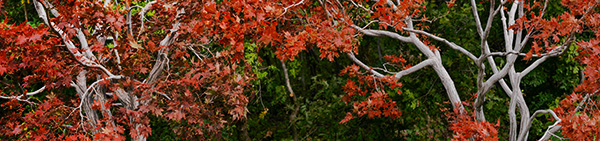 Red Butte Arboretum – Salt Lake City Utah. In-Camera Panorama Lumix GX7 Shot a few years ago.
Panorama images are not the be all and end all they are there to tell a story that can’t be told in the two by three or three by four ratio. Sixteen by nine is becoming a more ‘standard’ image size to our eyes because we see it more often in movies, television, and our phones.
This post was triggered by a question about the in-camera panoramic photos vs. shooting individual images and stitching photos in post production. Here was the question, “When I use the Lumix G7 it does a Gatling gun shoot as I shift the camera left to right and we all know you shouldn’t be moving a camera when shooting a landscape. I’m curious the quality difference between one shot at a time and stitched in an editor vs. the G7 spray technique.”
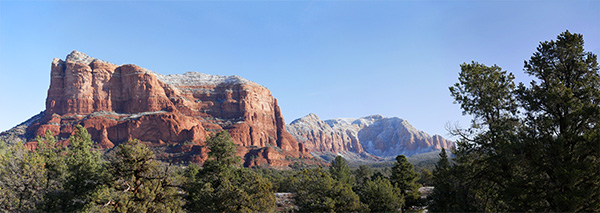
 Courthouse Butte in Sedona – In-Camera Panorama. Print to about 27 inches.
Great question. We have different tools for different jobs. The in-camera panorama feature is a tool for the convenience of capturing a scene quickly and being processed for output immediately. For example, you want to share a scene on social media that is panoramic in nature. The camera will produce a completed image that can instantly be uploaded via the camera’s built-in Wifi. It is also a fine way to capture a scene as a memory that will only live in the digital world where higher resolution is not a necessity. That’s not to say you can’t make a beautiful print from the in-camera pano, I’ve made some beauties.
Advantages of in-camera panoramic photos. Immediate gratification. Ideal for web presentation and medium sized prints.
Now to the advantages and drawbacks of a stitched image.
In the capture of individual images to create a panoramic in post-production, you can shoot in the RAW format which will give you a larger file and the ability to finesse the most quality from the file. The larger size files when combined allow for printing very large size images. The only down-side is that post-processing is necessary before you can share the picture as a panoramic.
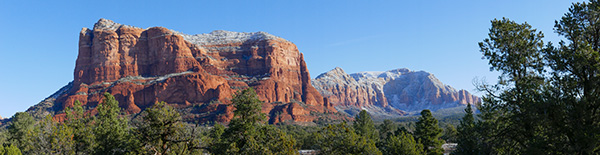
 Same scene as above. Ten frames stitched in Adobe Photoshop. Easily print to about Seventy-eight inches. Note the details and color were more available from the RAW file information.
Final thoughts. Use the best of both worlds. Make an in-camera pano to make a quick record of your scene. It can be utilized as a reference for the future building of your panorama or quick sharing of your view in social media. Make your individual images for large format printing.
Yours in creative Photography, Bob

by successfulbob | photography
Happy Holidays 2016
Hope that the end of this year launches you into a great 2017!
 Yours in Creative Photography, Bob
by successfulbob | inspiration, Lumix G7, Lumix Lounge, photography creativity, photography gear, time lapse, video
Stop Motion Video – Aloy Anderson
Through the Internet, I have met an avid advanced amateur photographer/videographer named Aloy Anderson. Aloy is always pushing to learn new and creative ways to use his cameras. I have never attempted stop-motion video myself even though it is a capability built into the Lumix Cameras. When Aloy shared his project with me, I asked if he’d mind sharing some of his thinking and his process with me. And now with you.
I invite you to check out his stop-motion video called Jungle Movie “Be Brave” and turn the rest of the post over to Aloy. Enjoy!
Jungle Movie “Be Brave” from Ray Anderson on Vimeo.
“My name is Aloy; I’m a photographer and Youtube content creator from Miami. From an early age watching Sesame Street, I’ve always been curious about how to make stop-motion animation films. In those days it took a 35mm camera with “miles” of film to develop which was out of my reach. When I realized my new Lumix G7 had the feature built in I was pleasantly shocked. I had to give it a try. My video “Jungle Movie” my first attempt at a storyline video.
When you enter the stop motion menu on the Lumix camera choose whether you will snap each shot independently with the shutter button or the camera can be set to shoot at your preset interval. I do a little of both to give me time to reposition the set pieces and camera placement. For simplicity, I chose 5 seconds between each shot to give me time to move the characters quickly and get out the way.
Stop-motion can be very tedious and time-consuming, and it’s tempting to take the easy way out by leaving the camera on a tripod in one spot. That would be a mistake akin to watching a whole movie from one angle. I suggest different scenes and locations for variety, using a wider lens to show establishing shots and standard lenses for shallow depth of field moments. Before you begin, have a definite storyboard in mind. I like to use manual focus and exposure for each shot.
Here are some tips.
1) Don’t to move each piece too far between each shot as I did in some of my Jungle Movie. The resulting video will have choppy movement. A few centimeters is a good start.
2) Keep the camera on a tripod or table-top to maintain a solidly grounded scene.
3) Every few shots check to make sure your exposure or focus point hasn’t changed.
4) As you improve, you will know what not to do next time and come up with more complex ways to tell your story.
5) Imperative before you begin, set your camera’s aspect ratio to 16:9 which will allow it to play back full widescreen rather than a smaller 4:3 photo size.
6) Finally, have fun!
I guarantee your first 10-second video attempt may look like a five-year-old did it but you will have a good laugh watching it play back with all its faults.
The good thing about the Lumix is when you’re finished making captures the camera will ask you how to customize your video rendering such as how many frames per second it will be and at what resolution. It will then stitch all those photos together into an MP4 file. The only downside is it will be a “silent” movie. In my case, I imported the MP4 into my video editor and added music and text titles to polish it off. It is crucial to add some form of audio to keep your video engaging. This information is not an exhaustive tutorial by any means, but the fun is learning as you go.
I invite you to visit my Youtube product review channel and my Flickr Photography album. Most importantly I would like to thank Bob Coates for inviting me to write this piece. Hopefully, you will have a good time learning this type of creative way to use your camera.”
Aloy Anderson.
Thanks to Aloy for sharing his first foray into stop-motion.
Yours in Creative Photography, Bob
PS – Most Lumix cameras have the stop-motion and time-lapse features built into the camera. If you have any questions about which camera might be best for your needs let me know.
Save
Save
by successfulbob | inspiration, photography - art quote, photography creativity
Sunday Photo/Art Quote – Minor White
Minor White was a black and white photographer who was at the forefront of pushing boundaries of what photography was all about. Abstract images of landscapes which had a tendency to disorient a viewer were among his gifts to the photographic world. In addition to being a ground-breaking photographer, he was an educator and editor of Aperture Magazine.
As they might say on CBS Sunday Morning, ‘Here now is today’s quote.’
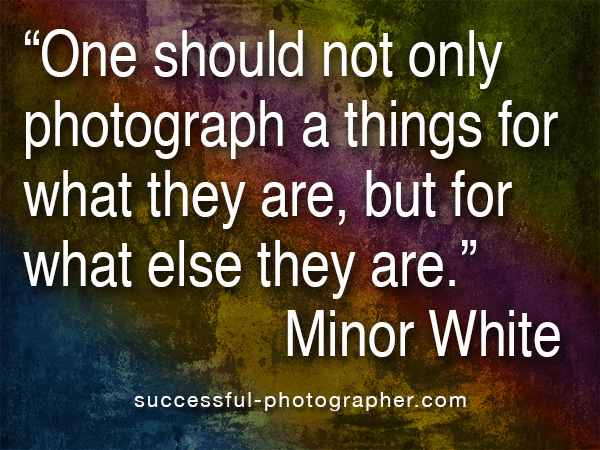
 “One should not only photograph things for what they are, but for what else they are.” – Minor White
We should spend time reviewing those photographers who came before us for education and inspiration. As in the fashion industry, we might mine the past for ideas, not to copy, but to build upon in taking our photographic work to new levels.
Yours in Creative Photography, Bob

by successfulbob | inspiration, photography, photography software
 MacPhun Software – Luminar & Aurora
What are we going to do when our software updates stop allowing us to use Google’s NIK Software? Right now it’s free for download if you want to use it! I highly recommend if you haven’t already taken advantage of this deal get to it. It’s good stuff! I even paid for it originally and was happy to do so.
But it won’t be around forever.
It may be Adobe or it may be our computer operating systems that will make the software no longer usable. For Apple computer users one answer lies with MacPhun Software. Some of the folks who were at NIK Software before Google bought them out have been working on some solutions at MacPhun.
At first, they came out with some stand-alone solutions for handling noise and adding creativity. They bundled them into a nice package called Creative Kit which had six different software solutions usable as plug-ins for Photoshop and Lightroom. Next came Aurora HDR software.
Here are a few images I dressed up using the software and since it’s a holiday promotion here you go.

 Next came Aurora HDR software followed by Aurora 2017* (see the deal below!). I like Aurora 2017 because it allows me to get the HDR process to increase the density range of an image but without the images screaming ‘HDRRRR!!!.’ And I still have the creative possibilities available. It is also a stand alone program. I have been fortunate to be able to work with MacPhun’s new software as it becomes available and I’m having a great time playing with the possibilities. I think you’ll like it too.
There’s a new stand-alone product that has just hit the market combining the software that is called Luminar**. Learn more about it below with a special deal until the New Year.
* Check out the Aurora 2017 Deal DetailsAurora HDR 2017 + Bonuses for only $89. Total value $175. Savings of 49%Give your holiday photos a truly unique look this year with Aurora HDR 2017 and our new Winter Preset Pack. Plus, improve your photography with training from Nature Photography Guides and Trey Ratcliff!
You get:
Aurora HDR 2017, the world’s #1 HDR software for Mac photographers
2 eBooks by Nature Photography Guides: “Forever Light: the Landscape Photographer’s Guide to Iceland” & “Iceland: Black & White Photography Portfolio by Sarah Marino” will inspire your photography to new heights.
Creative HDR Presets Pack: Use these exciting new presets to stylize and experiment with your photos.
20-minute Deep Dive video from Trey Ratcliff: Learn from the most influential HDR shooter of our generation, and co-developer of Aurora HDR 2017!
** Check out the Luminar Deal DetailsLuminar + Bonuses for only $59. Total value $319 Savings of 80%Celebrate the holidays with an incredible deal on our most popular photo editor to date and a host of bonuses sure to put a smile on your face!
You get:
Luminar, super-charged photo software for any Mac photographer
3 eBooks from Andrew S. Gibson: Mastering Photography, Mastering Composition & Mastering Lenses. The “Mastering” series is designed to help improve the creative aspects of your photography. They are aimed at intelligent and creative photographers who understand that light and composition are just as important as knowing which buttons to press on the camera.
Over 300 high resolution sky overlays: Use Luminar and this set of warm, blue or dramatic skies to enhance any image. Perfect for any photographer who has photos with dull or lifeless skies – bring them to life with this exciting collection!
Creative Portraits Preset Pack for Luminar: Make even more amazing photos with this speciality pack of presets ideal for improving any portrait.
How to Shoot Sandscapes by Baber Afzal: In this video, you’ll learn pro techniques for capturing the best sandscape photos possible.
Lots of good things for you. Happy Holidays!
Yours in Creative Photography, Bob
Save
Save




