by successfulbob | Lumix Lounge, macro, photography, photography software
In-Camera Focus Bracketing
Yesterday I shared info on in-camera focus stacking of images captured with the Post Focus Photo Mode in the Lumix GX85. The PFPM is a great feature for getting images from moving objects, quick captures and times where you won’t need to crop into the image very much because the still frames pulled from the video are eight megapixels. Eight megapixels can get you to a twenty-inch print with no problem but when you want to go big it’s time for a new feature built into the camera.
Focus Bracketing is different than the Post Focus Photo Mode in that the camera will be making image captures using the full-size files and changing the focus between each shot automatically. Here’s the screen you will see to set up the capture of multiple images with one push of the button.
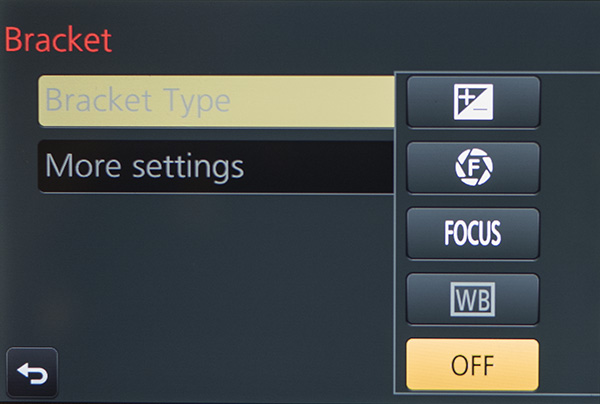 The new Bracket Menu. Options include Exposure Bracketing, Aperture Bracketing, Focus Bracketing and White Balance Bracketing.
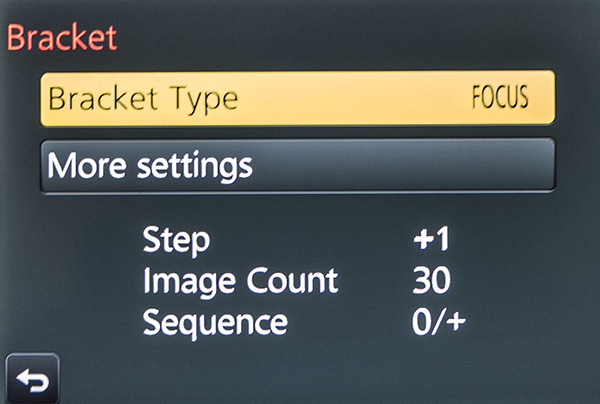 Menu with the Focus Bracket Chosen.
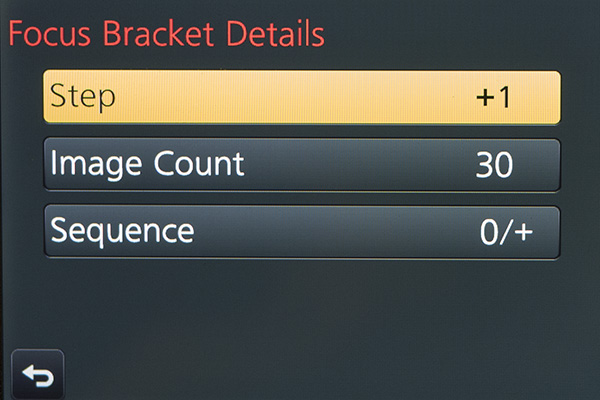 Each one of the menus adds choices. You’ll need to experiment and ‘bracket’ your choices as you learn the results. Step – is the distance that the focus will move on each exposure. Image Count – will be the number of frames made with a single push of the shutter button. You’ll want to ensure there’s enough to cover the scene. Sequence – is the order the images are taken in. Choices are 0/+ to start close and go far (I recommend) or 0/-/+ which will alternate how the bracket is accomplished. I found that Photoshop tends to choke when creating the focus stack using this setting.
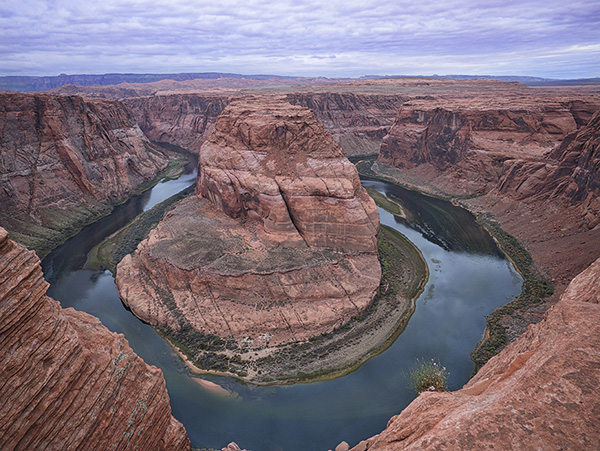
Here’s an example of a completed capture and focus stack using Adobe Photoshop taken at Horseshoe Bend just outside Page, Arizona. The Focus Bracketing allowed for a much deeper depth of field in the final image.
 Horseshoe Bend, Page Arizona. The depth of field extends from the near foreground to the far distance.
People ask why do you want to go to all this work? I just set my camera to a smaller aperture like f16 or f22 for deeper depth of field. There is some science that will come into play here. When you use smaller apertures, you will introduce diffraction into your image which will soften the image. There is a sweet spot in lenses between f5.6 and f10, depending upon the lens, that is the absolute best quality the lens can produce. That is the f stop to use when focus stacking. All the sharp areas will be the sharpest and highest quality when combined.
I’ll look at the actual focus stacking technique in a future post using Adobe Photoshop. There are also automatic software solutions like Helicon Focus, Zyrene Stacker, and possibly others for you to check out if you plan to do a lot of stacking.
Til then.
Yours in Creative Photography, Bob
Save
Save
by successfulbob | 4K photo mode, 4K video, Lumix GX85, Lumix Lounge, photography creativity, photography gear, video
In-Camera Focus Stacking
Cool beans!
Yep, I said it. Cool beans. This feature is quite handy when you want to photograph with a macro lens and show some incredible depth of field in your image.
The 4K Photo Mode in the Lumix GX85 and the G85 called Post Focus which allows you to choose the frame with the focus where you want it, after the shot, also allows you to focus stack the images together to enhance the depth of field. One downside to using this method is that we are pulling stills from the video which means there is 8MP worth of file size with which to work. A file of this size will get you to a 20-inch print with no problem, but if you want to go bigger, you’ll need to use a different method. I’ll share that with you in the next day or so.
Let’s take a look.
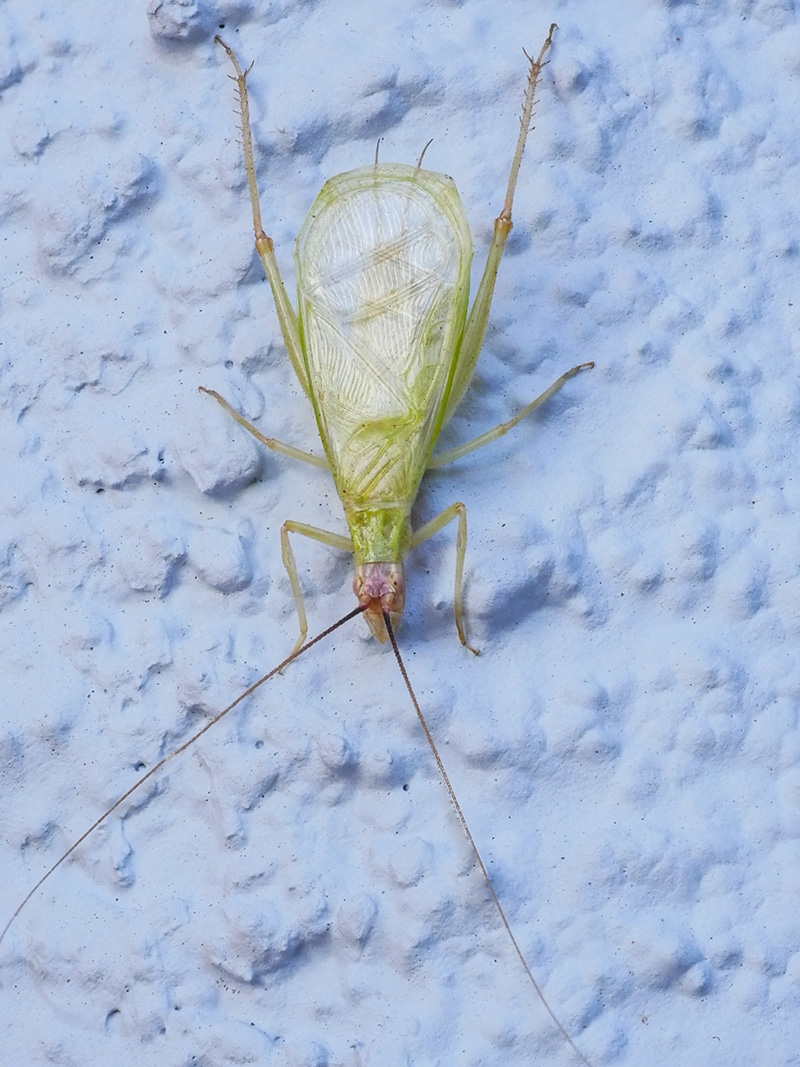
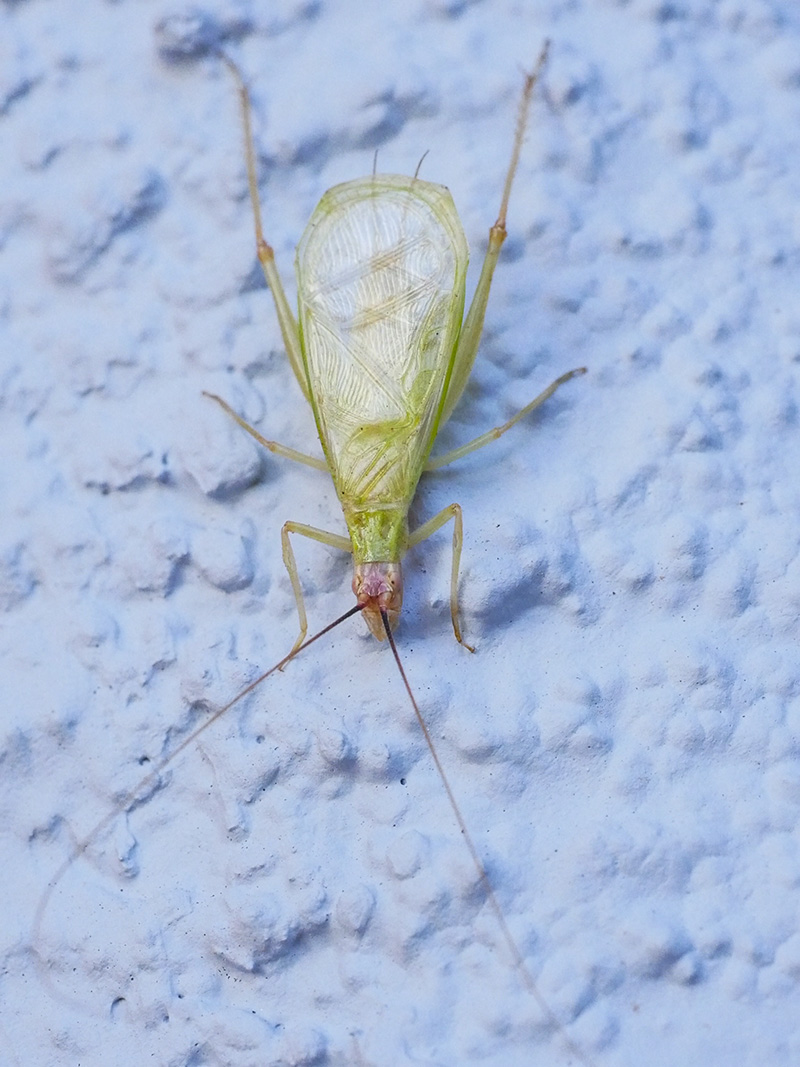 I call this Green Bug. This image is a single frame grab from the 4K video. Printable and OK. But let’s see something a little better.
Now let’s take a look at the image after all the images in the stack have been combined to show the sharpest parts of each frame in the video.
 Check out the detail throughout the photo now.
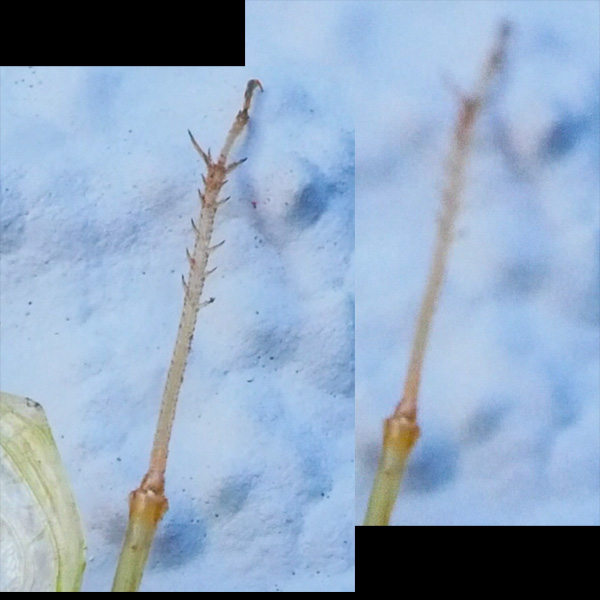 Here’s a little zoom in on the back leg of my friend the Green Bug.
Click Here to see the original video clip
This video image was captured with the Lumix GX85 with a 45mm f2.8 macro lens.
Tomorrow I’ll take a look at the Focus Bracketing feature that allows us to bypass the video and capture full-size images.
Yours in Creative Photography, Bob
by successfulbob | photography, photography - art quote, photography creativity
Sunday Photo/Art Quote – Ernst Haas
I love today’s Photo/Art Quote because it is hitting very close to home as I explore new ideas. The new explorations have received a head-start because I am always trying new ideas and attending classes, seminars, and conventions to expand my photographic knowledge.
I believe the quest is why I am still a photographer today. Photography is a career that I feel I will never be able to master. There is always a new technique, a different way of applying an old idea, and of course, new technology to learn.
Ernst, take it away.
 “I am not interested in shooting new things – I am interested to see things new.” – Ernst Haas
“See things new.” What a great thought. I have started to notice more lighting scenarios as I go about my daily business. Here are a couple of reasons I am noticing new ways of seeing and some thoughts for you.
I just took a Light-Painting class with John Hartman. Watching how he was layering (painting) in the light in tiny sections and then layering those images with thought and finesse to create the final image has me seeing in a new way. It makes you hyper-aware of the play of light on a subject and how you want to portray each little nuance of a scene. This technique also makes you pre-visualize how you want the final image to appear.
Making time-lapse videos has changed the way I watch light as the sun dips toward and below the horizon. It is almost as if I see now in time-lapse form. It’s kind of hard to explain, but if you start creating more time-lapse videos, you’ll start to know what I mean. The benefit to seeing like this is when taking still photographs you’ll have a better idea of the ideal time to snap the shutter.
There are more examples, but I’m done for today… It’s time to head into the studio and make more water droplet splash photos. Starting to see some fascinating things frozen in time. Yet another way to “See things new.”
I like it!
Yours in Creative Photography, Bob
by successfulbob | Lumix G7, Lumix Lounge, macro, photography creativity, photography gear, photography lighting resources
Water Splash Photography Setup
Heads-up here! This is my first foray into photographing water droplets. I’m sharing my current setup, and sure it will change as I learn more and experiment. I am taking you along on my adventure showing you the kind of work I’ve been able to create with this setup. Once again I will share I am no expert with this type of photography. If you’ve got some ideas for me, I’d love to hear them!
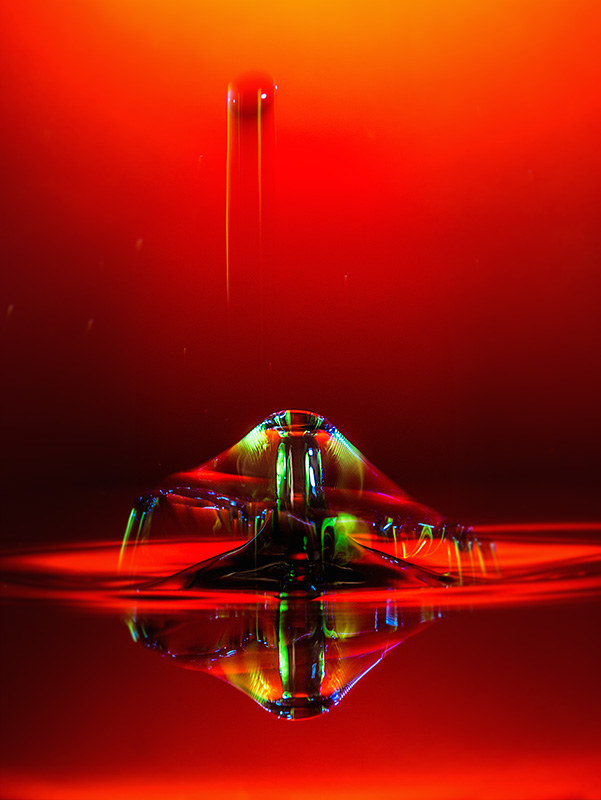
This photography is not for the faint of heart. By the way, you CAN do this photography with a couple of Speedlights and in some ways that may be better for more control of the results. I like the variability with the gear which I’ve been working. OK, with the disclaimers out of the way lets look at a water droplet photo and then the layout of all the stuff.
 Photograph achieved with the equipment setup as seen below. Exposures are made at f14 with @ one second ISO 200.
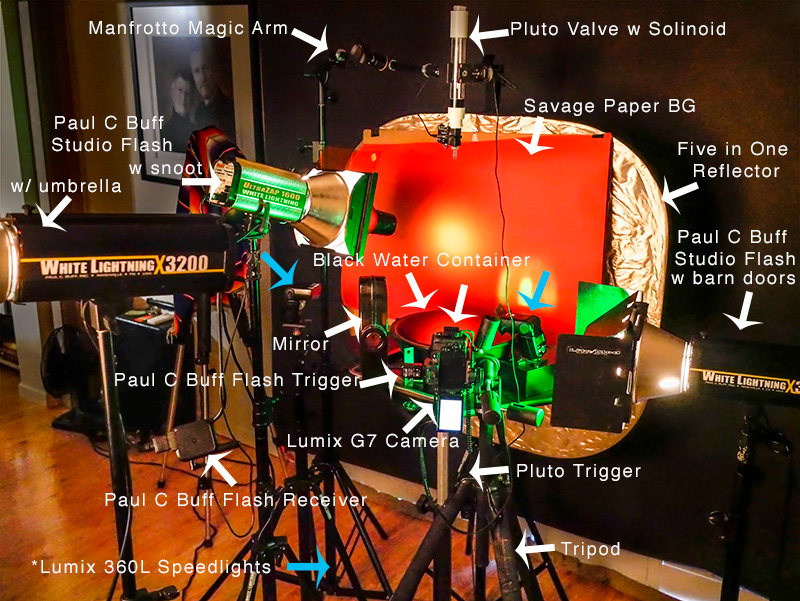 Here’s my gear. I’ll ‘splain below.
I decided to get a little head start on this type of photography by getting some necessary tools. The Pluto Trigger and Pluto Valve can save you a LOT of time. The Trigger is connected to the camera and controls the show. It tells the water drops when to fall. What size they should be and when to trigger the flash. All of these durations are in milliseconds (MS).
Backgrounds are only limited by your imagination. The one showing above is with a colored Savage Paper background. There is a gelled flash with a snoot to vary the light and add interest. With this setup, I have also used a reflective background with a gel over it lit by a flash at various angles and directions. You can use cloth or photos or printed patterns or almost anything you like. As I learn I’m trying to be careful not to overwhelm the waterdrops but we’ll see as I play how that transitions.
I used the Lumix G7 to capture these photos. Lens used was the Vario 35-100mm f2.8 lens with a 10mm or 16mm Vello extension tube. You will need a camera that has a trigger port or can communicate with the Pluto Trigger.
Connected to the camera is a remote flash trigger that fires the flash Paul C Buff flashes from the camera. The Lumix 360L flashes are triggered by the light from the Buff’s because I have them set to Slave Mode. It is the flash that freezes the motion of the water. Adding gels to the flashes adds color and interest to the splashes. In my images, you often see some streaks of color in addition to the frozen droplet. This is because I am using multiple types of flash. The Buff units are not as fast as the Speedlights. And the Speedlights can be of different durations if you change the amount of light you ask them to produce. The lower the power, the shorter the duration of light. Bogen Cine gels Vivid color are juicy. Roscoe gels work well too. You can get gel packs that are just the right size for fitting on your Speedlight. Here’s one from Roscoe holder for the gels.
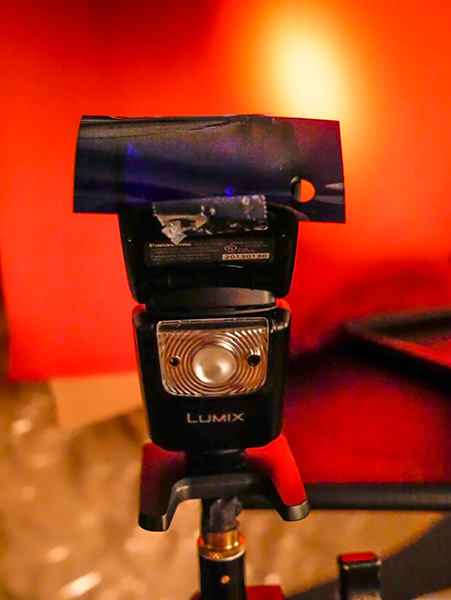 Lumix Speedlight with gel taped in place. Once you see how the gels perform you can also buy larger sheets and cut them to size for larger flashes.
I used a black bowl of water for the reflection. Black allows the color of the background to shine through. Fill the bowl as high as possible, so the edge of it doesn’t show. Science says you can fill a vessel higher than it top because of surface tension. Well, let’s not get into that too far, but as a side note, know that you can put 32 dimes in a shot glass before it overflows after you have filled it with water. Make sure you have a drip tray underneath the bowl or tray to catch any spills as you work.
If you don’t have enough lights, or just want to add another variable, note that you can add a mirror to the set to reflect light back from another direction.
The Manfrotto Magic Arm is extremely helpful in positioning the valve in place over the water. The Manfrotto Super Clamp holds the valve. When you are setting up the position of the water drops, watch where the water drop falls and put something in place to use to set your focus. Remove before shooting.
Working with water droplet photography is like photographing fireworks! You are never quite sure what you are going to get. You get to control the variables but there is never a guarantee and always fun surprises. (well sometimes not so fun but always a learning experience)
If you have any questions, let me know.
Yours in Creative Photography, Bob
Save
by successfulbob | photography - art quote, photography creativity
Sunday Photo/Art Quote – Ansel Adams
An icon in photography, Ansel Adams wrote quite a bit about photography and created a wealth of quotes to share on the subject. This morning’s quote has to do with thinking about becoming a better photographer. I believe you can accelerate the process if you consciously work at it with thought and purpose.
Today’s quote begs the question. “With what do you fill your mind?”
 “You don’t make a photograph just with a camera. You bring to the act of photography all the pictures you have seen, the books you have read, the music you have heard, the people you have loved.” Ansel Adams
I find the basis of this quote to be true.
About five or six years ago I started spending more time in art museums and studying specific artists. I found myself drawn to the impressionists such as Renoir, Monet, Degas and Van Gogh among others. I picked up this advice from fantastic fellow photographer Thom Rouse and think I have become a better photographer for it. The study o
What kind of things did I learn? The study of how colors work when placed side by side gave me a new insight to look for those color patterns in nature. I found there were more compositional techniques available than the rule of thirds. Using some of these ideas I began to blend multiple images together to create more painterly images.
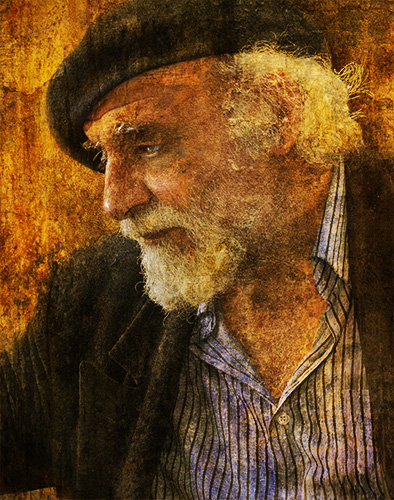
 An artist I met at the Montmartre in Paris. Monsieur Gorghy was my first full ‘painting’ using a technique I’ve dubbed ‘PhotoSynthesis.’
As you can see from the image above it turns out the impressionists began to inhabit my work. It didn’t happen overnight. Some of it was intentional but I recognized that it worked it’s way into other areas of my work as well. I now try to view different genres of art on a regular basis through books, movies, online and, of course, in museums.
Ansel got it right. I ask again, With what are you filling your mind?
Yours in Creative Photography, Bob
PS – Another wonderful photographer full of artistic ideas is Arthur Rainville You might want to check out some of his very emotive and emotional work.




