
by successfulbob | photography
Tip – Target Mode Macintosh Computer
Today’s post is brought to you by the letter “T.” The first three people who get in touch with me with the number of “T’s” that appear in this post get a 1/2 hour coaching session on the subject of your choosing.
When on the road I download images to my laptop computer to check on photos especially when experimentation with new techniques is involved. Such was the case this past week when I photographed sandhill cranes at Bosque Del Apache Wildlife Preserve in New Mexico.
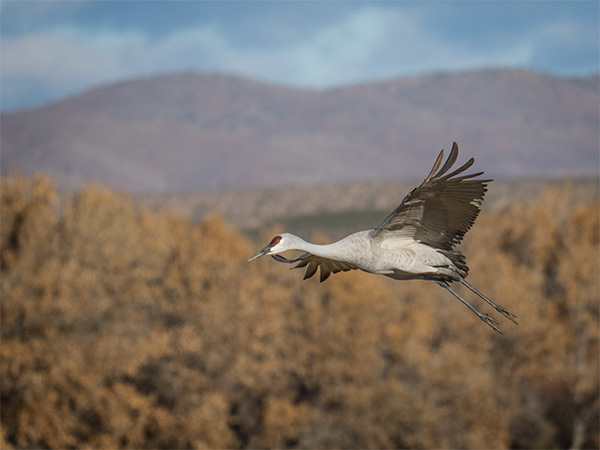 When photographing wildlife, especially when tracking birds in flight, you can be capturing lots of frames from testing shutter speeds, focus, and experimentation for special effects.
Upon return from a shoot like this, rather than download all the images from the camera cards all over again I start the computer up in Target Disk Mode. When in this mode the laptop is recognized as a hard drive when connected via a Firewire, USB, Thunderbolt, and transferring the files can be done pretty quickly. Saves extra time too as I’ve already been culling the duds and misfires and lightly processing some of the images.
 Here’s what your screen looks like when it is Target Mode. That little icon rides around on your screen.
Target Disk Mode is easy to do. Click the “Startup Disk” icon and click the Target Disk Mode button to restart your Mac in Target Disk Mode. You can also enter Target Disk Mode by rebooting your Mac and holding down the T key as it boots. Connect your Mac via a Firewire or Thunderbolt cable.
Yours in Creative Photography, Bob
Save
by successfulbob | inspiration, photography - art quote
Sunday Photo/Art Quote – William Eggleston
I share today’s thought from Eggleston who was one of the pioneers of the move to recognizing color photography a true art form. Remember as photography grew throughout the years any change to the medium was met with derision and skepticism. (can you say digital or Photoshop boys and girls??) As technology adds possibilities to processing our vision we get blowback from those who feel there is cheating going on… My personal feeling is can you get the image that is in your head output to another medium such as photo paper, metal or canvas or any material that helps tell the story the way you want it told. How you get there doesn’t matter to me.
Onward to the quote.
“You can take a good picture of anything. A bad one, too.” Willaim Eggleston
I share this idea with many people when I tell them I am a photographer and live in Sedona, Arizona. I almost always get this comment. “Oh, Sedona that’s a great place to be a photographer!” I always reply that yes Sedona is a beautiful place it’s not what makes for good photography. I’ve seen plenty of crappy photos of Cathedral Rock and I’ve seen some exquisite photographs of peppers and other ‘non-beautiful’ subjects.
We photograph the light. We photograph the shadows. We do it with composition and thought on color and juxtaposition of subjects within the scene.
I leave you with this thought. Are you taking (making) a good picture today?
Yours in Creative Photography, Bob

by successfulbob | photography software
New Photo Processing Software for MAC
Some very interesting software for photo editing has been released by the folks at MacPhun. Basically, you can set up this software very simply or you can build workspaces to create intricate working areas for complex projects. This is new stand-alone software and the price? Only $69. You can try it for free to see if it something that will work for you. Here are the details below.
 LUMINAR NOW AVAILABLE
Offer Available: November 17, 2017
Short Description of Luminar:
Luminar is a new all-in-one photo editor designed to ensure the ultimate in creativity and convenience. The Luminar user interface is built around the idea that every photographer is different, and therefore their photo editing needs are different too. Users can choose from pre-built user interface configurations that match their editing style and needs or create their own.
Pricing:
Retail Price: $69
Launch Price for Macphun Users: $49
Launch Price for New User Price: $59
Luminar Key Features:
• Adaptive User Interface
• Multiple Modes: From basic to advanced
• One-click switch between modes
• Change modes anytime
• All-in-one photo editing tool set
• Includes essential editing tools for different photography styles
• Live editing, live processing, live previews
• Non-destructive editing
• Works as a standalone app or plug-in
• RAW converter & processor
•History Panel
Take a look & try it for free.
Yours in Creative Photography, Bob

by successfulbob | photography - art quote
Sunday Photo/Art Quote – Dorthea Lang
For those who might not know, Dorthea Lang was a photojournalist who documented America during the depression era. Her photographs told the story of the great depression more powerfully than words could have done. I’m confident that even if you don’t know her name, you will recognize one of her most famous photographs taken during that time.
 Known as ‘Migrant Mother.’ Photo by Dorthea Lang
The Library of Congress caption reads: “Destitute pea pickers in California. Mother of seven children. Age thirty-two. Nipomo, California.”
Which brings us to the Photo/Art Quote for today on the Successful-Photographer blog.
 “Photography takes an instant out of time, altering life by holding it still.” Dorthea Lang
“Altering life by holding it still.”
Think about that for a moment.
How do you think about what do we do as photographers? Do you keep a thought such as this in your mind when you are making images for clients? When you change the focus of whatever you do in life to be helpful to others, you end up becoming more successful in the process.
This type of thought also should be shared with your potential clients when speaking about making images for them. Another way to say this is preserving memories but changing the phrasing can contribute to making this powerful message. There’s a line from Zig Ziglar. “You can have everything in life you want, if you will just help other people get what they want.” Sometimes people don’t know what they want in photography until it’s too late. The child has grown up too fast. A family member passes away. Things change amazingly fast in this world of ours and being able to freeze an instant of time is a magical gift.
Do you share those thoughts with your clients? Take the “instants” out of time and alter your client’s world for the better.
Yours in Creative Photography, Bob
Save
by successfulbob | Lumix Lounge, macro, photography, photography software
In-Camera Focus Bracketing
Yesterday I shared info on in-camera focus stacking of images captured with the Post Focus Photo Mode in the Lumix GX85. The PFPM is a great feature for getting images from moving objects, quick captures and times where you won’t need to crop into the image very much because the still frames pulled from the video are eight megapixels. Eight megapixels can get you to a twenty-inch print with no problem but when you want to go big it’s time for a new feature built into the camera.
Focus Bracketing is different than the Post Focus Photo Mode in that the camera will be making image captures using the full-size files and changing the focus between each shot automatically. Here’s the screen you will see to set up the capture of multiple images with one push of the button.
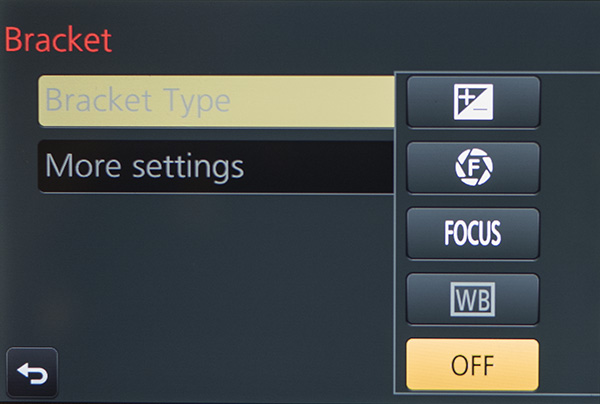 The new Bracket Menu. Options include Exposure Bracketing, Aperture Bracketing, Focus Bracketing and White Balance Bracketing.
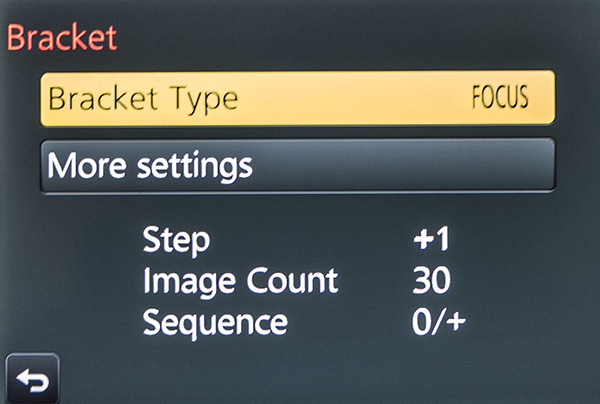 Menu with the Focus Bracket Chosen.
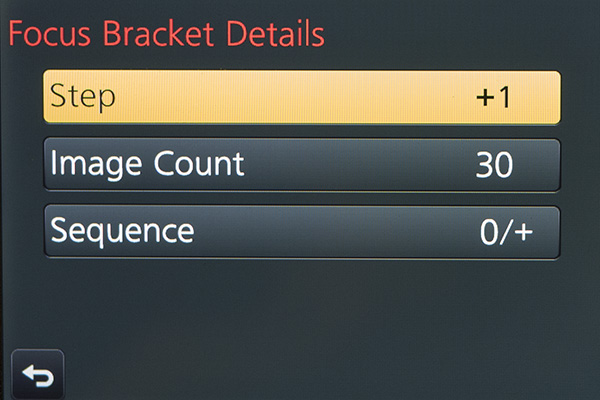 Each one of the menus adds choices. You’ll need to experiment and ‘bracket’ your choices as you learn the results. Step – is the distance that the focus will move on each exposure. Image Count – will be the number of frames made with a single push of the shutter button. You’ll want to ensure there’s enough to cover the scene. Sequence – is the order the images are taken in. Choices are 0/+ to start close and go far (I recommend) or 0/-/+ which will alternate how the bracket is accomplished. I found that Photoshop tends to choke when creating the focus stack using this setting.
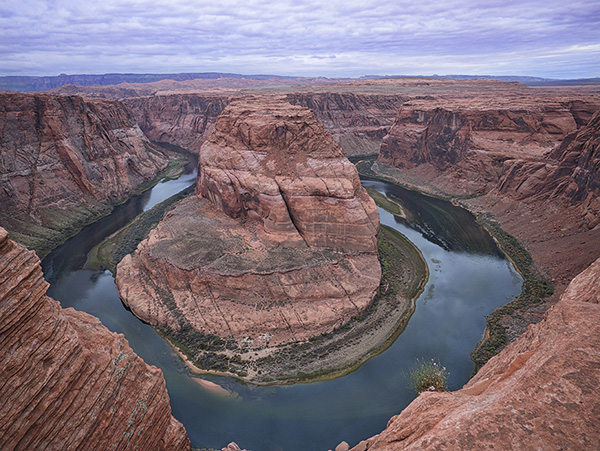
Here’s an example of a completed capture and focus stack using Adobe Photoshop taken at Horseshoe Bend just outside Page, Arizona. The Focus Bracketing allowed for a much deeper depth of field in the final image.
 Horseshoe Bend, Page Arizona. The depth of field extends from the near foreground to the far distance.
People ask why do you want to go to all this work? I just set my camera to a smaller aperture like f16 or f22 for deeper depth of field. There is some science that will come into play here. When you use smaller apertures, you will introduce diffraction into your image which will soften the image. There is a sweet spot in lenses between f5.6 and f10, depending upon the lens, that is the absolute best quality the lens can produce. That is the f stop to use when focus stacking. All the sharp areas will be the sharpest and highest quality when combined.
I’ll look at the actual focus stacking technique in a future post using Adobe Photoshop. There are also automatic software solutions like Helicon Focus, Zyrene Stacker, and possibly others for you to check out if you plan to do a lot of stacking.
Til then.
Yours in Creative Photography, Bob
Save
Save
by successfulbob | photography, photography - art quote, photography creativity
Sunday Photo/Art Quote – Ernst Haas
I love today’s Photo/Art Quote because it is hitting very close to home as I explore new ideas. The new explorations have received a head-start because I am always trying new ideas and attending classes, seminars, and conventions to expand my photographic knowledge.
I believe the quest is why I am still a photographer today. Photography is a career that I feel I will never be able to master. There is always a new technique, a different way of applying an old idea, and of course, new technology to learn.
Ernst, take it away.
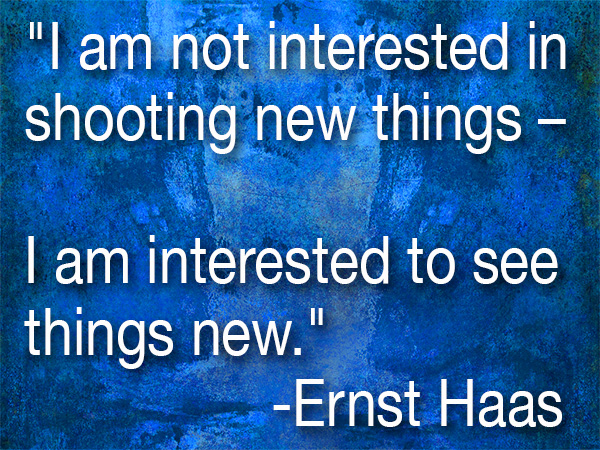
 “I am not interested in shooting new things – I am interested to see things new.” – Ernst Haas
“See things new.” What a great thought. I have started to notice more lighting scenarios as I go about my daily business. Here are a couple of reasons I am noticing new ways of seeing and some thoughts for you.
I just took a Light-Painting class with John Hartman. Watching how he was layering (painting) in the light in tiny sections and then layering those images with thought and finesse to create the final image has me seeing in a new way. It makes you hyper-aware of the play of light on a subject and how you want to portray each little nuance of a scene. This technique also makes you pre-visualize how you want the final image to appear.
Making time-lapse videos has changed the way I watch light as the sun dips toward and below the horizon. It is almost as if I see now in time-lapse form. It’s kind of hard to explain, but if you start creating more time-lapse videos, you’ll start to know what I mean. The benefit to seeing like this is when taking still photographs you’ll have a better idea of the ideal time to snap the shutter.
There are more examples, but I’m done for today… It’s time to head into the studio and make more water droplet splash photos. Starting to see some fascinating things frozen in time. Yet another way to “See things new.”
I like it!
Yours in Creative Photography, Bob




